
The Symbol Editor allows mathematical expressions to be entered using LaTeX, a standard language widely used for writing mathematical notation.
PrimeExam uses LaTeX together with MathJax to display mathematical expressions in questions, answers, and previews.
LaTeX Overview
LaTeX is a text-based language for representing mathematical expressions.
Instead of selecting symbols from a character map, you type simple commands that describe the mathematics you want to display.
For example:
- `\frac{a}{b}` displays a fraction. $ \frac{a}{b} $
- `x^2` displays an exponent. $ x^2 $
- `\sqrt{x}` displays a square root. $ \sqrt{x} $
- `\int_a^b` displays a definite integral. $ \int_a^b $
- `\alpha` displays the Greek letter α. $ \alpha $
Once rendered, the mathematical notation appears as professionally typeset mathematics.
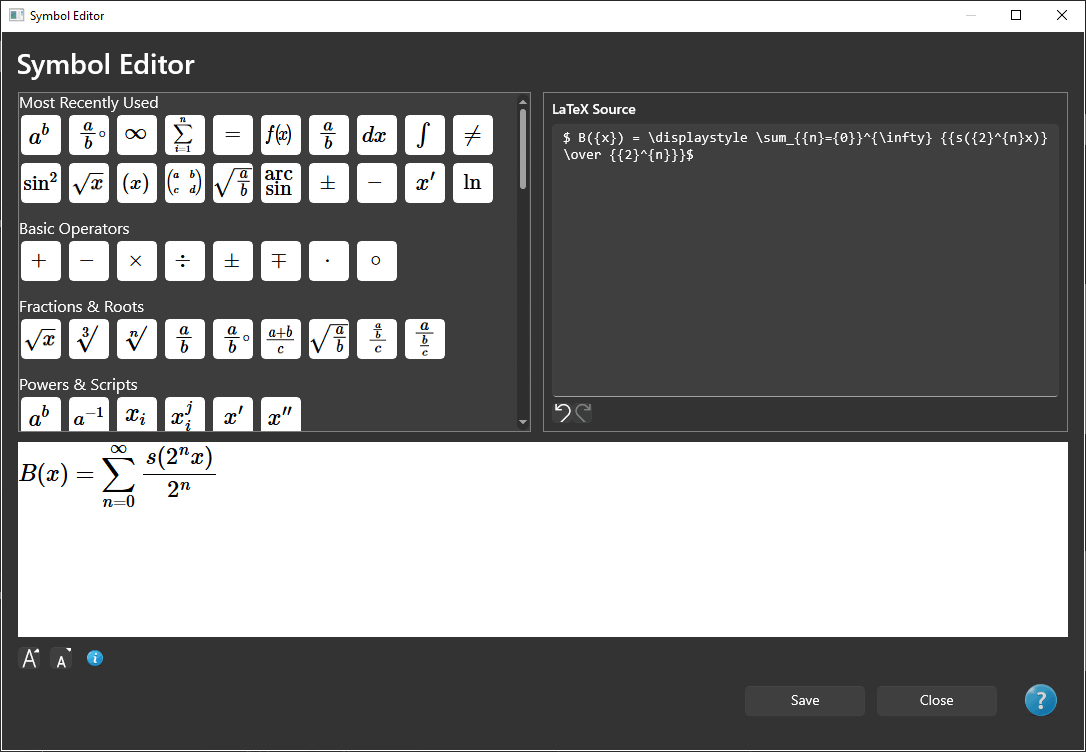
Inline and Display Mathematics
Mathematical expressions in PrimeExam must be enclosed within LaTeX math delimiters.
Inline Mathematics
Use a single dollar sign (`$`) before and after an inline expression:
The solution is $x=\frac{-b\pm\sqrt{b^2-4ac}}{2a}$.
Results in the following:
The solution is $ x=\frac{-b\pm\sqrt{b^2-4ac}}{2a} $.
Inline mathematics appears within the surrounding text.
Display Mathematics
Use two dollar signs (`$$`) before and after a display expression:
$$
x=\frac{-b\pm\sqrt{b^2-4ac}}{2a}
$$
Results in the following:
$$ x=\frac{-b\pm\sqrt{b^2-4ac}}{2a} $$
Display mathematics is centered on its own line and is generally used for larger or more complex equations.
Mixing Text and Mathematics
Only text enclosed within LaTeX math delimiters is interpreted as LaTeX.
Text outside the delimiters is displayed as ordinary text.
For example:
Find the value of $x$ when $x^2+4x+4=0$.
Results in the following:
Find the value of $x$ when $x^2+4x+4=0$.
The words are displayed normally, while the mathematical expressions are rendered using LaTeX.
LaTeX Delimiters
PrimeExam uses the standard dollar-sign delimiters commonly used with LaTeX and MathJax:
Inline mathematics:
$ LaTeX expression $

Display mathematics:
$$ LaTeX expression $$
The Symbol Editor automatically inserts the appropriate delimiters when creating mathematical expressions. Users who are familiar with LaTeX can also type the delimiters directly or paste LaTeX expressions that already contain them.
Symbol Buttons
The Symbol Editor provides buttons that insert commonly used LaTeX commands.
Symbols are organized into categories, including:
- Basic operators
- Fractions and roots
- Powers and subscripts
- Relations
- Calculus
- Greek letters
- Sets and logic
- Geometry
- Matrices and vectors
- Trigonometry
These buttons are intended to make entering mathematical expressions faster, especially for users who are new to LaTeX.
Entering LaTeX Directly
You are not limited to the symbols provided by the Symbol Editor.
Any valid LaTeX expression can be typed directly into the editor.
You can also copy LaTeX expressions from other applications or websites and paste them into the Symbol Editor. Expressions that already use `$...$` or `$$...$$` delimiters can be pasted without changing the delimiters.
Learning More About LaTeX
The following websites provide additional information and interactive LaTeX editors:
- CodeCogs Online Equation Editor
https://editor.codecogs.com/
- MathJax
https://www.mathjax.org/#demo
These resources can be useful when creating more advanced mathematical expressions.
Font Size
The font size control within the Symbol Editor affects only the preview displayed inside the Symbol Editor.
The font size used when questions are published is determined by the layout assigned to the question.
To permanently change the size of mathematical expressions in published exams, modify the appropriate font settings using the Layout Editor.